The digital menu with QR code for your restaurant
Your guest scans the QR code and your digital menu opens right on their smartphone. No app, in 19 languages. You change dishes, prices and colours yourself at any time, in your own admin area.
- Try it free for 1 week
- No app for guests
- We set up the menu with you
Price on request
As of today, live from our system. No projections: we count what actually happened. Scans are visits via QR code or link.
How does a QR code menu work?
A QR code menu is your menu as a web page. The QR code on the table leads straight to it. Your guests need nothing but their smartphone. Create a QR code menu: how the code gets onto the table (in German)
Guest scans the QR code
At the table, at the door or at the counter: point the camera at the QR code, done.
The menu opens
Right on the smartphone, with prices, variants, allergens and in the guest's language.
No app needed
No download, no sign-up. The digital menu works in any browser.
Example: the digital menu of Landgasthof Zur Lilie in Triberg
This is what Snackpot looks like for guests: the phone above runs the real menu of Landgasthof Zur Lilie, exactly as guests see it after scanning. Tap through the categories, switch the language or open the menu of Landgasthof Zur Lilie in full size.
Categories and search
Starters, mains, drinks: guests jump straight to a category or search for a dish.
Prices and variants
Sizes and variants with their own price, clearly shown on every dish.
Language choice
19 languages. The menu opens in the language of the smartphone.
Allergens and additives
Stored for every dish and clearly marked for guests right on the menu.
Live opening hours
At the top, guests see whether you are open right now and until when.
Built for the smartphone
Large text, fast loading, in any browser. No app and no sign-up.
Your digital menu, managed by you at any time
You get your own admin area and can manage your digital menu yourself at any time.
- Edit your menu: categories, dishes, descriptions and photos
- Change dishes and prices: online instantly, no reprinting
- Manage languages: check and adjust translations
- Set your own colours: main colour, background, text and accent
- Manage your QR code: with a ready-made print template to download
- More settings: opening hours, allergens, several menus
The admin area and the app are currently in German. Your guests read your menu in 19 languages.
Coming soon as an app. Same menu, same login: See what the Snackpot app looks like.
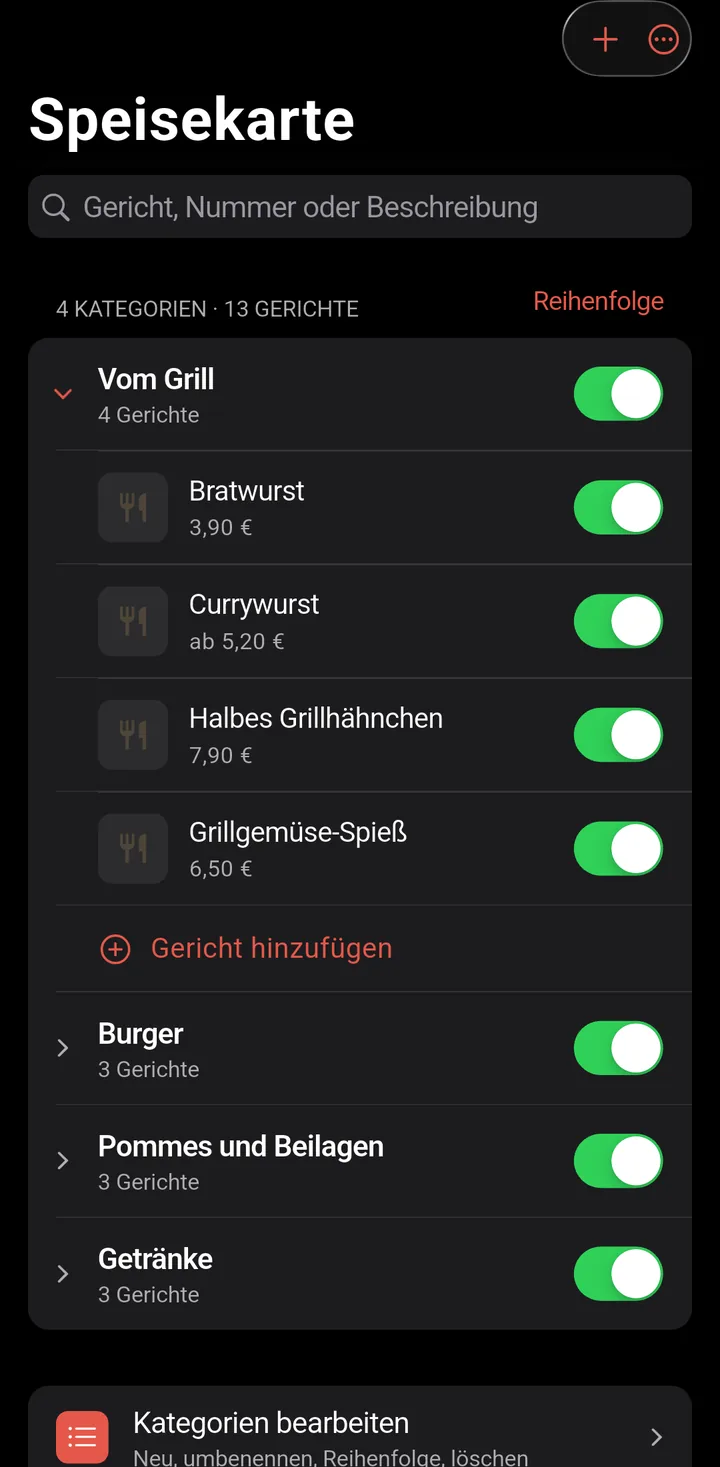
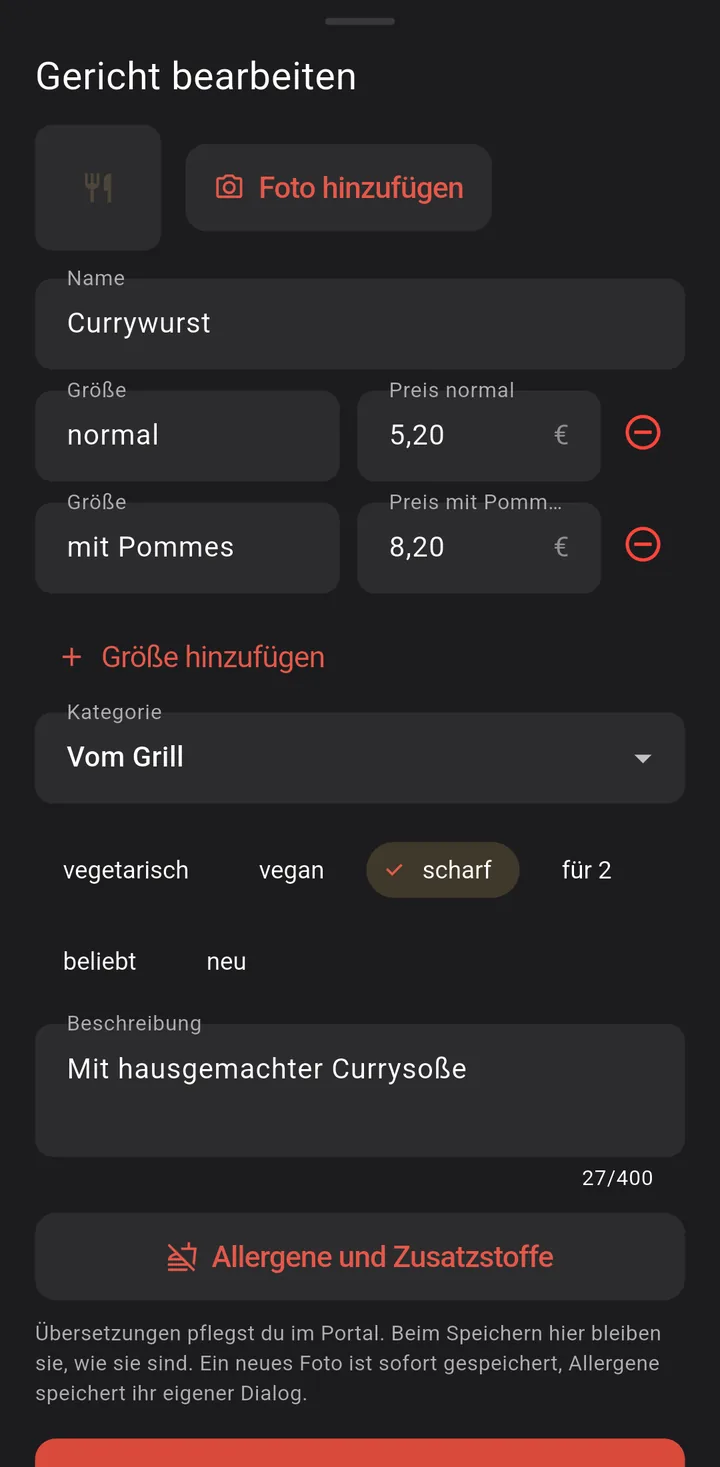
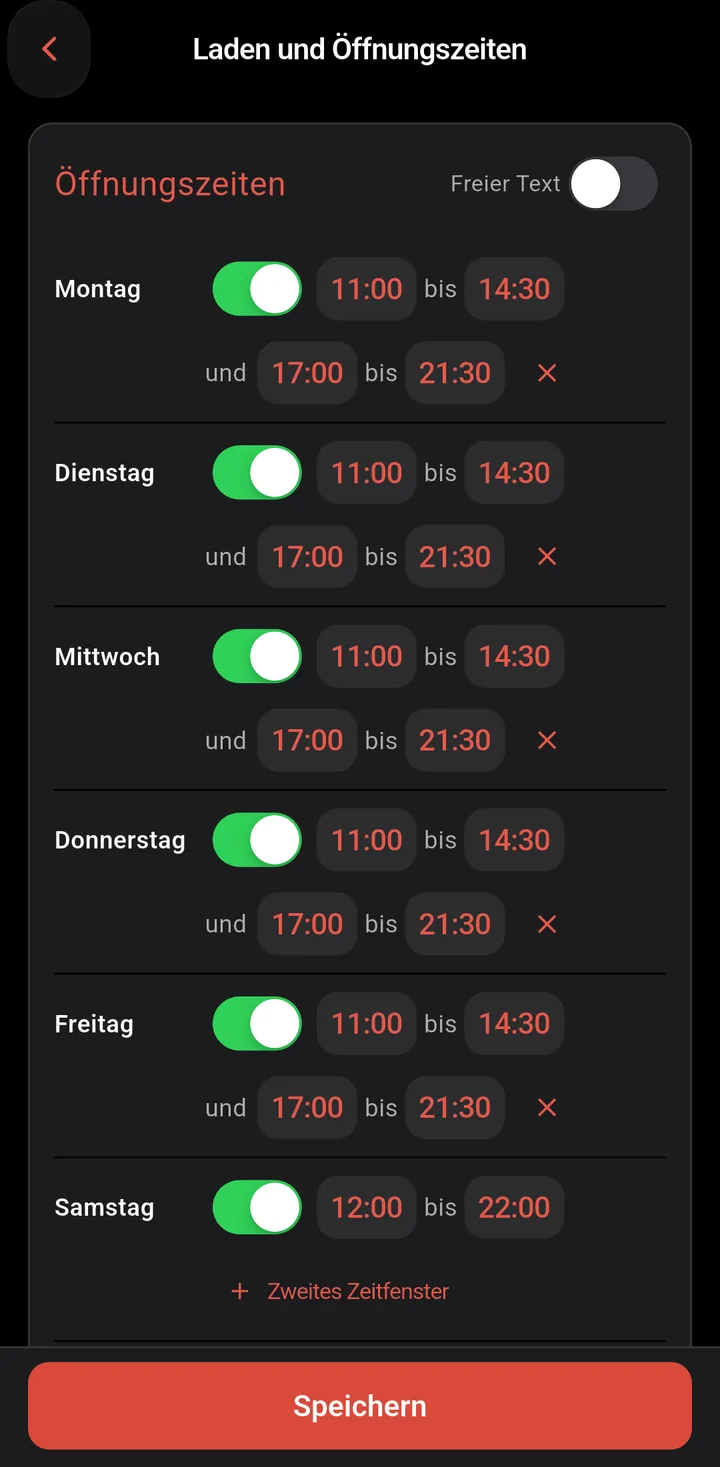
Manage your digital menu in the app as well
With the Snackpot app, your business fits in your pocket. Same account, same menu as in the admin area.
- Change dishes and prices wherever you are
- Sold out? Hide a dish with one tap and show it again later
- Take photos directly with the camera
- Keep your business and opening hours up to date
- Share your menu: QR code and link for your Google profile, Instagram and website
- New to Snackpot? Register your business right in the app
Coming soon to the Play Store and the App Store. The app is currently in testing. As soon as it is in the stores, you will find the way there right here.
Benefits of a digital menu compared with a paper menu
An online menu is not only quicker to change than a printed one. It takes work off your team and reaches guests who don't speak your language. Digital menu and paper menu compared (in German)
Multilingual
19 languages. Guests pick their own at the top of the menu.
Update any time
New price, new dish, sold out: the change is on every table instantly.
No more reprinting menus
The QR code stays the same, however often the menu changes.
Less work for your staff
Fewer menus to hand out and collect, fewer questions about ingredients and allergens.
Fewer language barriers
Guests read the menu in their language and order what they really want.
Handy for international guests
Tourist, trade fair visitor or neighbour: the menu speaks English, Turkish, Arabic, Ukrainian and more.
Central management
Everything in one place, in your own admin area, even with several menus.
Servers in Germany
No tracking, no ad networks, no cookie banners on your menu.
Multilingual menu in 19 languages
Your guests switch to their language themselves at the top of the digital menu. You can have the translations of your dishes created when your menu is imported and adjust them in the admin area. More about the multilingual menu (in German)
Participating venues: Snackpot is already running here
11 venues in Lauterbach, Offenburg, Schonach, Titisee-Neustadt and Triberg im Schwarzwald show their menus with Snackpot. Every location on the map leads straight to its menu. See all participating venues
Alt Tryberg
Hauptstraße 53, 78098 Triberg im Schwarzwald
Café Stein
Steinstraße 25, 77652 Offenburg
City Grill Kebap
Hauptstraße 65, 78098 Triberg
Gasthof Adler
Fohrenbühl 1, 78730 Lauterbach
La Cascata
Hauptstraße 83, 78098 Triberg
Landgasthof Zur Lilie
Wallfahrtstraße 3, 78098 Triberg
Personal, on site and risk-free
We come to your business and set up your digital menu with you. Then you test it at your own pace, and only then do you decide.
We drop by
We take a look at your business and your menu and show you what Snackpot looks like for your guests.
We set up the menu with you
We transfer dishes, prices, photos and colours together, plus the QR code for your tables.
Test for 1 week, then you decide
You test the menu free of charge for 1 week. Then you tell us whether you'll stay.
Everything included
- Digital menu with QR code, no app for your guests
- Your own admin area: change dishes, prices and photos yourself at any time
- Multilingual menu in 19 languages
- Your own colours for your menu
- QR code and ready-made print template
- Additives and allergens as required by law
- Import your menu from a photo, with a ready-made prompt for ChatGPT, Gemini or Claude
- Several menus per business, for example indoors and terrace
No payment details.
Prefer to get started yourself? That works too:
Download the print template, put it on the table, done.
A good fit for your business: from restaurants to food trucks
Restaurant with a terrace or takeaway with a counter: a menu with a QR code works wherever guests order. Which businesses benefit and how (in German)
Frequently asked questions about the digital menu
What is a digital menu?
A digital menu is your menu as a web page, built for the smartphone. Guests open it via a QR code on the table or via a link. Other names for it are QR code menu, online menu or e-menu.
Do my guests need an app?
No. The digital menu is a normal web page. Any smartphone with a camera opens it, without a download and without signing up.
Can I change dishes and prices myself?
Yes, at any time. You get your own admin area where you change dishes, prices, photos, descriptions and opening hours. The change is on the menu instantly, and the QR code stays the same.
Do I have to type up my menu by hand?
No. You copy our ready-made prompt into ChatGPT, Gemini or Claude, attach photos of your menu and paste the answer into the admin area. Categories, prices and descriptions land on the menu in one go, and then you fine-tune everything individually.
Which languages is the menu available in?
The menu supports 19 languages, including English, Turkish, Arabic, Russian, Ukrainian and Chinese. Guests switch to their language themselves at the top of the menu. You can have the translations of your dishes created when your menu is imported and adjust them in the admin area at any time.
How do I get the QR code for my restaurant?
In the admin area under QR code, with a ready-made print template in your colours: as an A4 poster and as A6 table cards. The QR code stays the same, even if you change the menu later.
Can I list allergens and additives?
Yes. For every dish you tick the allergens (A to N under the EU Food Information Regulation, with subgroups) and the additives, and the menu shows them with a legend. You can also print the allergen record for your business as a PDF.
Where is my data stored?
On servers in Germany. The menu works without tracking, without ad networks and without cookie banners.